Module 10 - Considering the Showing Evidence Tool for Your Project
Activity10.3
Sharing Your Practice Case
During this activity, you will work with another team to review each other's work. Besides reviewing each other's learner sample case, also provide feedback on the prompt and overall project idea. Consider whether your practice Showing Evidence case supports and begins to provide answers for the overall questions of the project. Use the Help Guide if you need assistance in completing any of the ICT skills identified.
This activity models what is necessary in your classroom when using reviewing teams. When using the Showing Evidence Tool, plan for guided reflection activities with your learners.
Step 1: Reviewing the Practice Case
-
Briefly share your project’s topic, assessment standards, and overall concept with your reviewing team, and have them share the basic information about their project. Ask each other if there is something specific that they need feedback on. What type of feedback would you expect from Student Teams?
Provide each other with the login information so that both can log in as a reviewing team to view the case and make comments.
Log in to the Showing Evidence Student Workspace at: www.intel.com/education/showingevidence
Click the link Projects to Review at the top of the Showing Evidence Projects table.
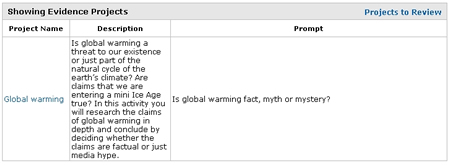
Click the link for the name of the project you want to review.
You will see the team's current work. You cannot make changes to the work, but you may make comments as a review team by clicking the small triangle at the upper-right corner of the evidence, the evidence rating, the support rating, or the claim.
In the next step, return together to discuss the Showing Evidence case and overall project ideas.

